Your business accounts don’t have to sit on one office computer. Cloud bookkeeping in Singapore uses an online accounting system to store and manage financial records, giving authorised users access to the same information through a web browser. It brings bookkeeping into a shared digital workspace instead of tying it to one device.
Digital records can make routine finance tasks easier, but it’s just as important to understand how the system works and what it means for your data. A well-planned setup keeps figures accessible and records organised, while still requiring care with access permissions and financial information.
This guide explains how cloud accounting works and what online services, live figures, bank feeds and shared access can do for a business. It also covers backups, security and practical considerations for using cloud bookkeeping as your Singapore business grows.
Key Takeaways
- Cloud accounting keeps business records in an online system, making them accessible to authorised users through a web browser.
- Bank feeds can bring transactions into your accounts automatically, while timely reconciliation helps keep the figures useful.
- Shared access lets business owners and finance support work from the same records, with permissions suited to each user’s role.
- Automated backups and encryption can help protect financial data, but good access controls remain important.
- Understand how cloud tools fit your bookkeeping, payroll and tax needs before choosing a setup for your business.
Online Accounting Services – Why Are They Good for Your Business?
Cloud accounting replaces separate spreadsheet files or desktop records with a shared online ledger. For Singapore businesses, the right software can support daily bookkeeping, management decisions and government submissions.
Bookkeeping Packages for Singapore SMEs
A bookkeeping package may cover transaction recording, account reconciliation, expense tracking and financial reports. Its scope depends on transaction volume, reporting needs and whether payroll or tax support is also required. Review how the service handles data entry, corrections and the balance between bank records and ledger entries. A clear process shows owners which tasks are covered and which remain in-house.
Spreadsheets can work for simple tracking, but they rely on manual updates and can lead to errors when several files circulate. Desktop accounting software stores work on a particular computer, while cloud accounting lets authorised users access shared records wherever they have internet access. Cloud software updates can also reduce the need for businesses to manage desktop installations themselves.
GST, IRAS and InvoiceNow Compatibility
Which Singapore accounting software supports GST, IRAS and InvoiceNow requirements? Choose accounting software with GST reporting features and InvoiceNow compatibility suited to your registration status. IRAS identifies IMDA’s accredited InvoiceNow-Ready Solutions list as a resource for businesses using off-the-shelf finance software. In Singapore, GST registration is required when taxable turnover exceeds S$1 million, according to the Inland Revenue Authority of Singapore.
From November 2025, newly incorporated companies that register voluntarily for GST must transmit invoice data to IRAS through InvoiceNow. From April 2026, all new voluntary GST registrants, regardless of incorporation date, must use InvoiceNow as a condition of registration. Software can organise figures for GST reporting, but records and filings still need review before submission. The Inland Revenue Authority of Singapore says companies must file Estimated Chargeable Income within 3 months of their financial year-end.
Outsourced Cloud Bookkeeping Services
Can Singapore businesses outsource cloud bookkeeping, and what services are included? Yes. Outsourced support can include recording transactions, reconciling accounts, organising receipts and preparing management reports. The agreed scope determines whether payroll or tax compliance is included too. Shared accounting software gives the business and its accounting support access to consistent records, helping clarify cash position and outstanding items.
Use reports to monitor income, expenses and account balances before making decisions. For example, review unpaid customer invoices alongside supplier bills to plan upcoming payments. Cloud accounting software may also automate invoice reminders and categorise expenses, but teams should check entries for accuracy. Choose a setup based on reporting needs, GST requirements, InvoiceNow compatibility and the work your team wants to outsource.
Real-time figures, bank feeds and multi-user access
Bank feeds bring transactions into cloud accounting, reducing repeated data entry. Their value depends on how consistently imported activity is reviewed and matched.
Automated Bank Transaction Imports
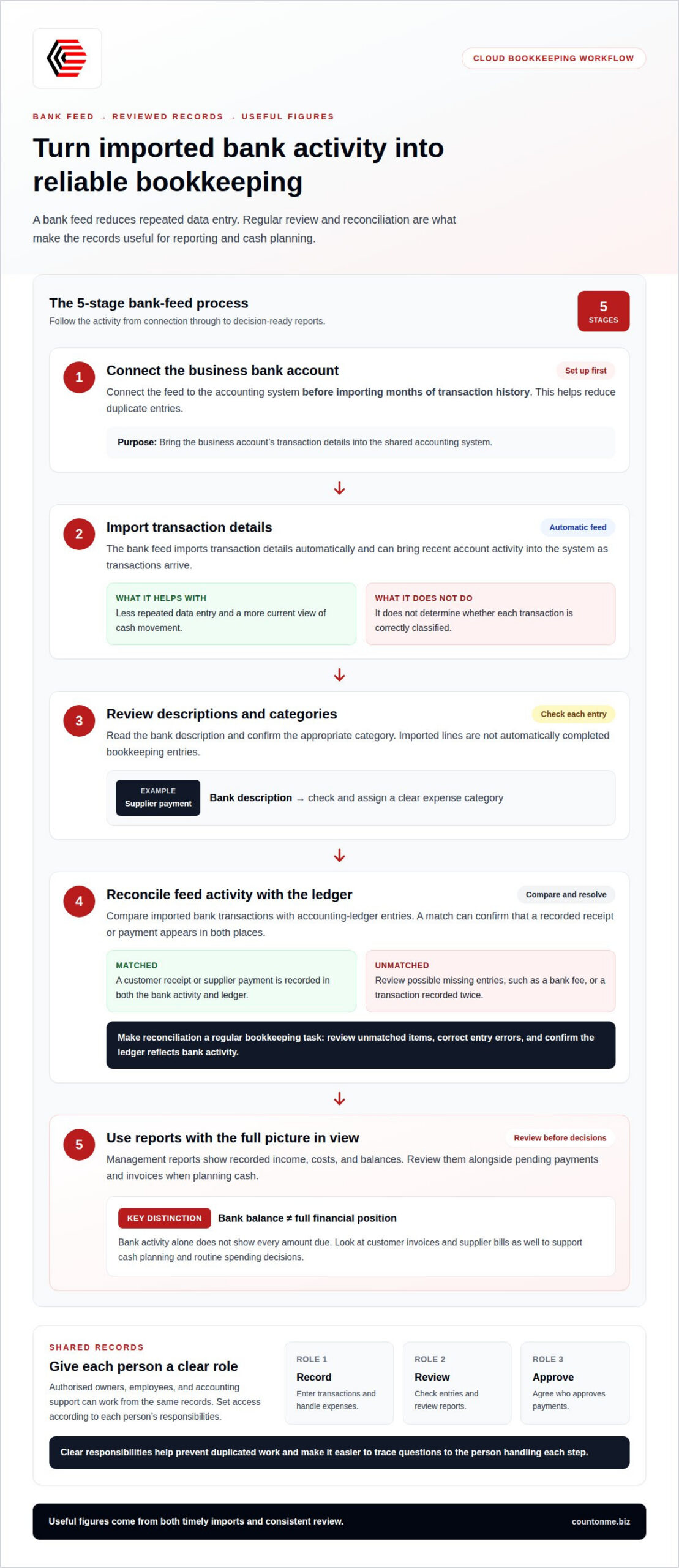
A bank feed connects a business account to its accounting system and imports transaction details automatically. Connect the feed before importing months of transaction history to reduce duplicate entries. Then review descriptions and categories: the feed transfers transaction data but doesn’t determine whether each item is correctly classified.
For example, a supplier payment may appear in the feed with a bank description that needs a clear expense category. Regular reviews keep the ledger useful for reporting, rather than treating each imported line as a completed bookkeeping entry.
Real-Time Financial Visibility
Bank feeds can bring recent account activity into the accounting system as transactions arrive. This gives owners a more current view of cash movement than manually entering each transaction later. A growing business can use that view to spot customer payments and monitor expenses before making routine spending decisions.
Management reports turn recorded activity into a view of income, costs and balances. Review them alongside pending payments and invoices, because bank activity alone doesn’t show every amount due. This distinction supports smoother cash planning and helps prevent confusing a bank balance with the full financial position.
Multi-User Access
Cloud accounting lets authorised employees, business owners and accounting support work with the same financial records. Assign access according to each person’s role, so a staff member handling expenses doesn’t have the same responsibilities as someone reviewing reports. Shared records also reduce the need to pass spreadsheet versions between people.
For payroll, the relevant team can use current records when preparing payroll information and related reports. Agree on who records transactions, who reviews them and who approves payments. Clear responsibilities help prevent duplicated work and make it easier to trace questions to the person handling each step.
Bank Reconciliation
Reconciliation compares imported bank transactions with entries in the accounting ledger. A match can confirm that a recorded customer receipt or supplier payment appears in both places. Items that don’t match may need review, such as a bank fee without a corresponding ledger entry or a transaction recorded twice.
Make reconciliation a regular bookkeeping task, not something left until filing deadlines approach. Review unmatched items, correct entry errors and confirm that the ledger reflects bank activity. If you want support organising this workflow, explore cloud accounting and bookkeeping services.
What is Cloud Accounting?
Cloud accounting stores business transactions and records online rather than on one computer. In Singapore, authorised users can access the same financial data through a web browser.
Cloud Bookkeeping Access and Setup
Setup involves creating the accounting records, importing opening balances and connecting relevant bank feeds. Cloud accounting software can be set up in a few days using these steps. Starting with accurate opening figures gives later reports a reliable base, while transaction imports help bring ongoing activity into the system.
Users can access the platform through a browser on different devices, whether they’re at the office or working remotely. For example, an owner can review a cash flow report remotely and discuss its figures with an accountant using the same records.
Scalable User Access and Features
Cloud subscriptions can let a business add or remove users and features as its needs change. A growing company might begin with access for its owner and bookkeeping support, then add staff who handle expenses or review management reports. Each person’s role should guide their access.
Feature choices also affect how the system supports business activity. A business may need transaction tracking first, then additional reporting functions as operations change. Review which features support current accounting work and which would add complexity without helping the team’s actual tasks.
Real-Time Financial Data Access
Cloud platforms can show financial data as records are updated. Recent transactions, expenses and customer receipts help owners understand cash flow between reporting periods. This view is useful for management, but reflects the entries already recorded, so missing or incorrectly categorised transactions can affect the picture.
Use current figures alongside context, such as unpaid invoices and upcoming supplier payments. For example, a positive bank balance doesn’t show which bills are due. Reviewing these records together gives a more practical basis for day-to-day decisions and annual planning.
Data Sharing and Collaboration
Cloud accounting gives business owners, employees and accounting support access to the same financial data. A shared record can reduce conflicting spreadsheet versions and make it easier to discuss transactions or reports. Agreeing who enters, reviews and approves information helps keep collaboration clear.
For example, an employee can record a business expense while a manager reviews the report. Accounting services can then work from the same entries instead of waiting for a separate file. Set responsibilities for updates and approvals so each user understands their role in maintaining accurate records.
Data security, backups and certification
Financial records can include invoices, bank statements and client details. Protecting that information means considering how it is captured, stored, accessed and recovered, not just where the accounting software runs.
AI document scanning and data capture can reduce manual entry by reading details from documents such as supplier invoices. Review a captured amount or date against the original invoice, especially if the scan is unclear. Treat automation as a way to organise records, not proof that every entry is accurate. For example, compare the supplier name and total with the source document before approving the transaction.
Cloud platforms can encrypt financial data in transit and at rest. Encryption helps protect data as it moves between a user’s device and the platform, and while it is stored there. Access controls matter too: assign permissions according to each person’s role, and remove access when responsibilities change. Someone recording expenses may need different permissions from a person approving entries or viewing corporate reports.
ISO certification can be one factor when assessing a platform’s security controls. Read what a certification covers and whether it applies to the service handling your accounting data. Don’t treat a certification label as a substitute for understanding access permissions, encryption and data handling. For a Singapore business, also consider where data is processed. Under Singapore’s Personal Data Protection Act, overseas transfers of business data must meet PDPA obligations and provide adequate protection.
Automated backups can help safeguard accounting records and support recovery after unexpected events. Understand how backups fit into the platform’s recovery process, including how staff regain access and resume work. Identify who manages recovery and which records the business needs first, such as bank statements, invoices and transaction histories. A backup supports recovery, but doesn’t replace accurate bookkeeping or sensible access management.
Centralised financial data gives authorised users a shared record instead of scattered files in desktop folders and email attachments. Keep receipts, invoices and transaction details associated with the relevant accounting entries. During incorporation or later business changes, organised records can help maintain continuity when responsibilities shift. Review subscription settings and permissions as your team changes, and keep only the access each user needs.
Explore cloud accounting and bookkeeping support
Count On Me: Cloud Accounting & Bookkeeping
Count On Me helps Singapore businesses organise financial records through cloud accounting and bookkeeping. Turn to us when transaction recording, bank reconciliation or management reporting is taking time away from running your business, or when you want finance records handled through a shared digital workflow.
As your needs extend beyond bookkeeping, related support can include Payroll Management Solutions, Tax Compliance & Advice, and Corporate Secretary Services. This can connect day-to-day records with payroll and compliance tasks as part of your finance processes. The right scope depends on the work your business needs handled.
If you’re ready to discuss cloud accounting and bookkeeping support, contact Count On Me.
Make Your Next Finance Decision With Confidence
Start by mapping how a transaction moves from receipt to review, then identify where delays or repeated manual work affect your routine. This gives you a clear starting point for shaping cloud bookkeeping in Singapore around your business, rather than changing processes without a purpose.
Consider which records need attention first, who should access them and what information helps you make decisions. A focused conversation about your current workflow can turn those priorities into a workable plan for your finance operations.
With a clear starting point, you can take the next step at a pace that suits your business.
Frequently Asked Questions
When should you add an outsourced accountant?
Add outsourced accounting support when transaction recording, reconciliations or financial reporting are taking time away from running your business. It can also help when records are falling behind or management needs a clearer view of cash flow. For example, if sales and expenses are recorded inconsistently across spreadsheets, an accountant can help establish a more reliable bookkeeping process and keep finance tasks moving.
What is cloud bookkeeping and how does it work in Singapore?
Cloud bookkeeping uses online accounting software to record and manage business transactions. Authorised users access the same records through a web browser, while bank feeds can import transaction details for review. For a business seeking cloud bookkeeping in Singapore, the practical workflow includes setting up its ledger, entering opening balances, organising supporting documents and reconciling transactions so reports reflect recorded activity.
What are the best cloud bookkeeping software options for Singapore businesses?
The best option is software that fits your business’s accounting workflow, reporting needs and compliance requirements. For example, a GST-registered business may prioritise GST reporting and InvoiceNow compatibility, while a small team may value clear user permissions and straightforward transaction review. IRAS points businesses using off-the-shelf finance software to IMDA’s accredited InvoiceNow-Ready Solutions list as a resource for assessing suitable options.
How much does cloud bookkeeping software or service cost in Singapore?
The cost depends on the case and is provided after a quote request. For software, consider the subscription features and user access your business needs. For bookkeeping support, the scope of work, transaction volume, reporting requirements and inclusion of payroll or tax compliance can affect the quote. Separating software access from professional bookkeeping work helps clarify what each part of the arrangement covers.
What are Singapore’s bookkeeping, accounting record-keeping and GST rules for businesses?
Singapore companies must maintain proper accounting records, and companies must keep accounting records for at least 5 years under the IRAS record-keeping rule. GST registration is required when taxable turnover exceeds S$1 million, according to the Inland Revenue Authority of Singapore. GST-registered businesses file returns, including Form F5, every quarter under the Goods and Services Tax Act. Keep source documents organised with the relevant entries.
How do you set up cloud bookkeeping for a Singapore sole proprietorship or company?
Start by choosing accounting software that suits your business structure and the records you need to maintain. Create the ledger, set up relevant income and expense categories, enter opening balances, then connect bank feeds and import transactions. Keep invoices and receipts with their entries. For a company, include corporate records in the bookkeeping workflow; for a sole proprietorship, keep business transactions distinguishable from personal activity.