
The most automated option isn’t automatically the best fit. The right choice among Counto alternatives in Singapore depends on whether you need bookkeeping software alone or support that also covers GST, tax, and statutory responsibilities. Singapore companies must retain accounting records and supporting documents for at least five years from the end of the relevant financial year, so reliable record-keeping matters as much as convenience.
It’s easy to focus on how quickly a tool categorises transactions, but a useful comparison looks at more: what gets automated, how exceptions are handled, and what support is available for compliance tasks. This guide compares accounting options across bookkeeping automation, transaction categorisation, GST, tax, and statutory responsibilities. You’ll see where software-led tools fit, when hands-on support may help, and what to weigh when choosing an approach that can support your business as it grows.
Key Takeaways
- Compare accounting options by how they categorise transactions and handle bookkeeping exceptions, not just by how much they automate.
- Look beyond subscription structure to understand which bookkeeping, payroll and tax tasks each option covers.
- Assess whether a platform’s connections with IRAS, InvoiceNow and local banks fit the way your business sends and records transactions.
- Use the decision guide to match software-led or outsourced support to your compliance workload and business needs.
Automated bookkeeping and transaction categorisation
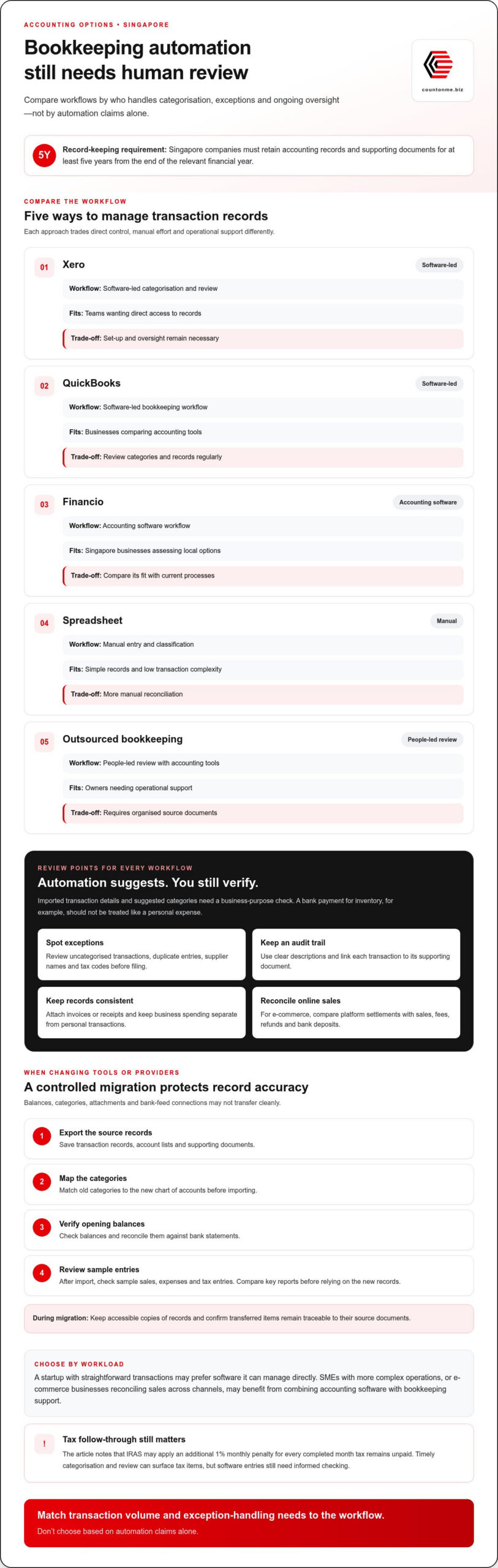
For businesses comparing Counto alternatives in Singapore, automation can reduce repetitive data entry, but it doesn’t remove the need for review. Accounting software can import transaction details and suggest categories, but you still need to confirm each item’s business purpose. For example, a bank payment for inventory should not be treated like a personal expense.
Look for a workflow that makes exceptions easy to spot. Review uncategorised transactions, duplicate entries, supplier names, and tax codes before filing. Clear descriptions help you trace each transaction from the bank feed to its supporting document. This audit trail supports accurate bookkeeping and gives owners better visibility into revenue, expenses, and cash flow.
What are the pros and cons of Xero, QuickBooks, Financio, and other alternatives? Xero, QuickBooks, and Financio are software options for organising accounting records. Their interfaces, categorisation workflows, and available connections differ. Software gives you direct access to records, while spreadsheets offer flexibility but require more manual checking.
Which alternatives suit Singapore startups, SMEs, and e-commerce businesses? A startup with straightforward transactions may prefer software it can manage directly. SMEs with more complex operations, or e-commerce businesses reconciling sales across channels, may benefit from combining accounting software with bookkeeping support.
| Option | Transaction workflow | Best fit | Trade-off |
|---|---|---|---|
| Xero | Software-led categorisation and review | Teams wanting direct access | Set-up and oversight remain necessary |
| QuickBooks | Software-led bookkeeping workflow | Businesses comparing accounting tools | Review categories and records regularly |
| Financio | Accounting software workflow | Singapore businesses assessing local options | Compare its fit with current processes |
| Spreadsheet | Manual entry and classification | Simple records and low transaction complexity | More manual reconciliation |
| Outsourced bookkeeping | People-led review with accounting tools | Owners needing operational support | Requires organised source documents |
Match transaction volume and exception-handling needs to the workflow. Don’t choose based on automation claims alone.
What risks and migration issues arise when changing software or providers? Opening balances, historical categories, attachments, and bank-feed connections may not transfer cleanly. Reconcile closing balances, preserve source documents, and compare key reports before relying on the new records.
A practical migration sequence keeps the transition controlled:
- Export transaction records, account lists, and supporting documents.
- Map old categories to the new chart of accounts before importing.
- Check opening balances and reconcile them against bank statements.
- Review sample sales, expenses, and tax entries after import.
Singapore companies must retain accounting records and supporting documents for at least five years from the end of the relevant financial year. Keep accessible copies during migration and confirm that transferred records remain traceable to their source documents.
Automation also depends on consistent source data. Use clear transaction descriptions, attach invoices or receipts, and keep business spending separate from personal transactions. For online commerce, reconcile platform settlements against sales records, fees, refunds, and bank deposits. This helps you spot mismatches before they affect revenue reporting or a filing.
Tax follow-through matters too. According to the Inland Revenue Authority of Singapore, an additional 1% monthly penalty may apply for every completed month tax remains unpaid. Timely categorisation and review help surface tax items for attention, but software entries still need informed checking.
What are the prices and subscription plans for Counto alternatives in Singapore?
The monthly subscription doesn’t tell you everything about the work included. Accounting software, outsourced bookkeeping, and compliance packages cover different tasks, so comparing headline fees alone can hide important differences. A software plan may provide bookkeeping tools, while a service arrangement may include transaction processing and review. Match each fee to the work your business actually needs.
For a software subscription, assess the plan’s limits and billing structure. Check whether it supports the users, business entities, and transaction workflows you need. Then find out whether payroll, tax filing, or additional integrations require separate subscriptions. A lower entry tier may suit a newly incorporated company with simple records, while growing operations can require more functionality or hands-on support.
Outsourced bookkeeping packages are shaped by the work involved. Transaction volume, sales channels, document quality, reporting frequency, and level of review all affect the scope. An e-commerce business reconciling marketplace settlements and refunds has different needs from a consultancy handling a small number of monthly invoices. Clear, consistent transaction records make it easier to define the work required.
Digital providers may price annual compliance separately from bookkeeping. Treat these as distinct line items rather than assuming one subscription covers everything. Compare inclusions such as financial record preparation, corporate tax support, GST-related work, payroll processing, and statutory administration. Review plan details for exclusions, add-on charges, billing frequency, and how the scope changes when transaction activity shifts.
Use this checklist before comparing plans:
- List monthly transaction types, sales channels, and required reports.
- Separate software access from bookkeeping and compliance work.
- Identify add-ons for payroll, GST, tax filing, or extra entities.
- Check billing frequency, contract terms, and how scope changes are handled.
- Compare the total work covered, not just the subscription label.
When a quote is involved, the price depends on the specific work required. Transaction volume, record condition, service scope, and reporting needs shape the cost. Comparing those factors helps you assess similar services rather than treating software and professional support as interchangeable.
As a practical next step, compare your workload with the accounting support available, then decide which tasks your team can manage directly.
Use published benchmarks as a starting point, not as a substitute for a scope check. The guide’s pricing and package information was publicly checked in August 2026. The difference reflects how activity and service requirements can change the amount of work involved, so compare these ranges with your own records and reporting needs.
Annual compliance may be priced separately from recurring bookkeeping. Confirm what an entry package covers and whether bookkeeping, tax support, payroll, or other required work is included or charged separately. Ask providers to describe the work covered and how fees may change if your transaction volume or records change. This makes it easier to judge whether a lower starting price suits your business or leaves important tasks outside the package.
Which Counto alternatives offer outsourced bookkeeping, payroll, and corporate tax filing?
Singapore businesses can compare three models: accounting software, specialist service providers, and firms that combine bookkeeping with compliance support. They differ in who processes transactions, manages payroll workflows, and prepares corporate tax information. Start by identifying the work you want handled, not the provider’s label.
Software subscriptions give your team tools for recording transactions and preparing accounts. They suit owners who can manage bookkeeping internally and coordinate payroll or tax filing separately. For example, a startup might use accounting software for invoices while its finance lead prepares records for corporate tax work.
Outsourced accounting providers handle bookkeeping tasks, often using cloud accounting software to process source documents and organise transactions. Their scope may include recurring bookkeeping and management reports. Payroll and corporate tax filing may be separate services, so compare each task rather than assuming a bookkeeping package covers them.
Payroll specialists focus on salary processing and related payroll administration. This model can suit an SME with consistent bookkeeping but limited in-house payroll capacity. A business with employees and multiple sales channels may combine payroll support with bookkeeping, keeping financial records and staff-payment workflows distinct.
Integrated accounting firms can bring bookkeeping, payroll, and corporate tax support together. This can reduce handoffs between providers, especially when payroll totals need to flow into accounting records. Understand who manages each stage, from collecting documents to reviewing reports and completing filing tasks.
| Alternative model | Bookkeeping | Payroll | Corporate tax filing | Typical fit |
|---|---|---|---|---|
| Accounting software | Tools for in-house processing | Often managed separately | Preparation remains with the business or its adviser | Teams with internal capacity |
| Outsourced bookkeeping | Provider-led record processing | May be separate | May be a separate engagement | Owners delegating transaction work |
| Payroll specialist | Usually outside core scope | Primary focus | Usually separate | Businesses needing payroll support |
| Integrated accounting firm | May be included | May be included | May be included | Businesses seeking coordinated services |
Compare alternatives using a scope checklist: transaction processing, report frequency, payroll inputs, tax preparation, filing responsibility, and the records you must provide. For example, confirm whether monthly bookkeeping includes bank reconciliation or only transaction categorisation. Clear boundaries help prevent duplicate work and missed handoffs.
Also map the workflow before choosing. Identify who gathers invoices, who reviews payroll data, and who prepares corporate tax figures. If your business uses separate systems for sales and payroll, note where data must be transferred. A written task map makes service gaps easier to spot.
Choose a specialist when one function is the main pressure point. Choose a combined service model when bookkeeping, payroll, and tax work need coordinated handling across the same accounting records.
Which accounting platforms in Singapore integrate with IRAS, InvoiceNow, and local banks?
Xero, QuickBooks, and Financio are platforms to compare, but don’t assume one connection covers every workflow. IRAS, InvoiceNow, and a local bank serve different steps in your accounting process. Check each connection separately: tax information and filing, electronic invoice exchange, and bank transaction feeds.
An accounting platform can organise figures for tax work without completing a corporate tax filing. Likewise, an InvoiceNow connection supports electronic invoicing, while a bank feed imports transaction data. Treat these as separate capabilities. For example, a business could receive invoices electronically, import bank transactions, then review its records for tax preparation.
| Platform option | IRAS workflow | InvoiceNow workflow | Local bank workflow |
|---|---|---|---|
| Xero | Assess tax-record and filing workflow | Assess invoice exchange support | Assess bank-feed connections |
| QuickBooks | Assess tax-record and filing workflow | Assess invoice exchange support | Assess bank-feed connections |
| Financio | Assess tax-record and filing workflow | Assess invoice exchange support | Assess bank-feed connections |
| Other accounting software | Compare tax workflow | Compare e-invoicing workflow | Compare available bank feeds |
Use the same test for every option. Identify the bank accounts, invoice process, and tax tasks your company needs. Then map each item to a platform feature or a separate manual step. This avoids treating a feature label as proof that the entire workflow is automated.
For a Singapore business, review these practical details before choosing:
- IRAS: Separate tax-record preparation from actual return filing and review responsibilities.
- InvoiceNow: Check whether invoices can be exchanged in your intended sales and purchasing workflow.
- Local banks: Match the bank feed to the business account, then review how imported transactions are reconciled.
- Data flow: Trace an invoice from receipt through accounting records and reporting.
For example, a retailer receiving supplier invoices through InvoiceNow still needs to match them against payments recorded by its bank. A service company might focus instead on customer invoices and bank deposits. These examples show why the right integration depends on actual operations, not a platform’s general feature list.
Before switching, document the manual steps that remain. Note who reviews imported transactions, resolves mismatches, and prepares tax information. This gives your team a clear basis for comparing Xero, QuickBooks, Financio, and other options, without confusing data transfer with completed compliance work.
Explore accounting platform support
Xero, QuickBooks, and Financio are the platforms named for comparison. Check each separately for its IRAS tax workflow, InvoiceNow support, and local bank feeds. Don’t assume any platform covers all three.
For deadline planning, the Inland Revenue Authority of Singapore gives November 30, 2026, as an IRAS tax deadline for Singapore businesses. Treat that date as a prompt to confirm who prepares and reviews the required tax information, rather than assuming an accounting integration completes filing or removes the need for manual steps.
Count On Me: Cloud Accounting & Bookkeeping
Count On Me provides Cloud Accounting & Bookkeeping for Singapore businesses seeking organised financial records and practical support with accounting workflows. It can be a natural next step if software alone leaves your team handling too many bookkeeping tasks or coordinating compliance work across separate processes.
As your needs extend beyond transaction records, Payroll Management Solutions, Tax Compliance & Advice, and Corporate Secretary Services can support related business responsibilities. The right starting point depends on what is taking the most attention: maintaining accounts, managing payroll, handling tax matters, or meeting corporate secretarial requirements.
Describe the workflow you want to improve and the support you need. Contact Count On Me to discuss accounting and compliance support for your business.
Choose the support that fits your next stage
Choosing among Counto alternatives in Singapore is an opportunity to shape a finance workflow around how your business operates, not simply replace one tool with another. Consider which tasks need specialist attention now and which your team can manage confidently. Revisit that balance as your operations change, so your accounting process continues to support clear decisions.
Count On Me provides Cloud Accounting & Bookkeeping, Payroll Management Solutions, and Tax Compliance & Advice. These services can help businesses coordinate day-to-day records with related finance responsibilities. Start by identifying the task that takes the most attention, then discuss what support would make the greatest difference.
A thoughtful next step can make financial administration more manageable and leave you with greater focus for building your business.
Frequently Asked Questions
What Singapore accounting and tax compliance requirements should I consider when choosing a Counto alternative?
Choose an option that supports accurate records, clear tax workflows, and accessible supporting documents. Singapore companies must retain accounting records and supporting documents for at least five years from the end of the relevant financial year. For example, make sure a software or provider change won’t leave prior invoices detached from ledger entries. Also distinguish bookkeeping and tax preparation from responsibility for reviewing and submitting filings.